Trading 212 declaration guide · Updated 3 September 2026
Trading 212 investment account: how to declare it to VMI
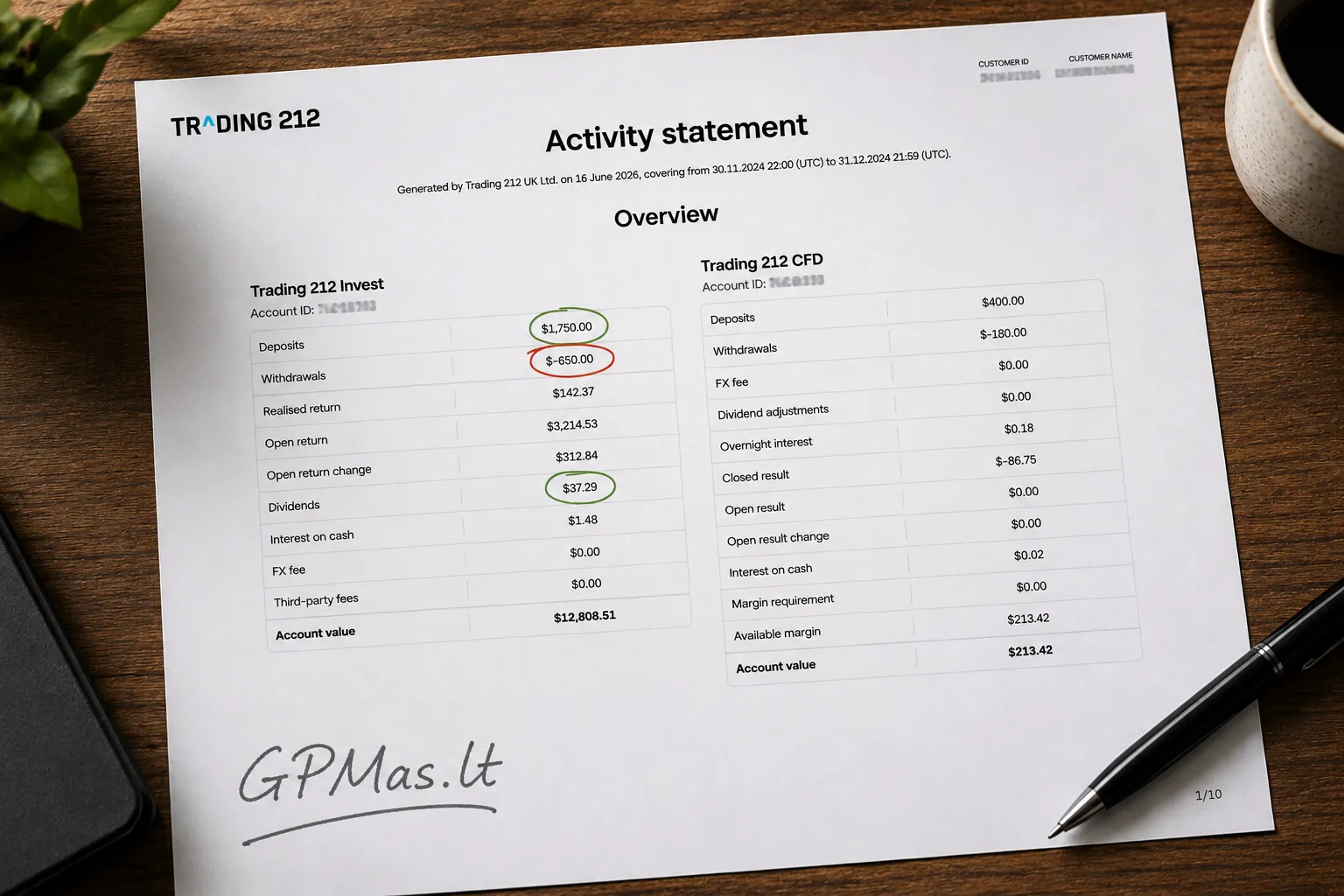
Trading 212 Activity Statement
VMI states that an account held through Trading212 may be declared as an investment account. It must be in your name and used under the conditions of the investment account tax regime. If you already use a suitable Trading 212 Invest account, you do not need to open another account just for the declaration. You declare the existing cash account linked to your investments.
Supported sources: Trading 212 History CSV and Activity Statement PDF. Rules checked against VMI and Trading 212 information.
How do you prepare Trading 212 data for GPM311?
The Trading 212 account is declared in section H of GPM311. This section records the account details and the transactions needed to calculate tax. This guide covers the Trading 212 Invest account, not the CFD account.
GPMas starts with the History CSV for the tax year. It asks for an official statement only when account identity, opening cash, dividends, cash or position reconciliation needs it. Earlier History CSV files can support a limited FIFO reconstruction for pre-2025 holdings; if history is incomplete, you can enter a reviewed manual IS amount. The Trading 212 report guide shows how to download the files.
Download the Trading 212 files required for your situation.
Upload them to GPMas together.
Review the detected Invest Account ID, transaction dates, amounts, dividends and warnings.
Use the summary to check and complete section H of GPM311. If you received dividends, also review the relevant section F information.
GPMas does not file the return for you or send data to VMI. It extracts GPM311 transaction rows, dividend information, source comparisons and warnings from the uploaded files. The files are not stored after the request. The GPMas methodology page explains the calculations.
Which Trading 212 account details does VMI require?
VMI asks for the financial institution or service provider name, code and country, the account number or unique identifier, the opening date and the date from which you use the account under the investment account regime. Trading 212 operates through several legal entities, so first check the bottom of the Menu screen in the app to see which entity serves your account.
Field
What to enter
Where to check
Financial institution
The official name of the Trading 212 legal entity that serves your account.
The bottom of the Menu screen, your agreement and the Activity Statement header.
Institution code
Usually the registration code of the legal entity. Check the official documents for your specific entity.
Your Trading 212 account documents and its official legal-entity information.
Account identifier
Your Trading 212 Invest Account ID.
The "Trading 212 Invest Account ID" field in the Activity Statement PDF.
Country
The country of the Trading 212 legal entity that serves your account.
The entity shown in the app or your agreement.
Opening date
The actual date on which your Invest account was opened.
Your agreement or account documents. Contact Trading 212 support if you cannot find it.
Regime start date
The date from which you actually use the account under the investment account regime.
2025-01-01 if you met the conditions from the start of the regime, or the actual later date.
How do Trading 212 contributions and withdrawals change the balance?
Under the investment account regime, the important figure is not your annual Trading 212 profit. It is the movement of money and the order of those transactions. Tax is deferred while the amount paid out of the investment account does not exceed the contributions accumulated by that date.
A transfer from a regular bank account to Trading 212 increases the contribution balance. Money paid from Trading 212 to a non-investment account, or used for a purpose outside the regime, reduces it. The part of a withdrawal that exceeds the contribution balance is treated as taxable income.
Current account→Trading 212 InvestContribution
Trading 212 Invest→Current accountWithdrawal
Your bank investment account→Your Trading 212 investment accountTransfer between investment accounts
GPMas reads each "Deposit" and "Withdrawal" entry in the History CSV using its transaction date. A non-EUR amount is converted using the official rate for that date. A transfer between two investment accounts declared by the same person is not a new contribution or withdrawal, but the records for both accounts need to agree.
Buying or selling eligible shares or ETFs does not normally create a personal income tax liability at the time of sale while the money remains under the investment account regime. Dividends, interest, CFD transactions and other products that require separate treatment follow their own rules. GPMas is not a FIFO capital gains calculator.
How does a EUR 1,500 withdrawal change the balance?
Suppose you add EUR 4,000 to Trading 212, later add another EUR 1,000 and then withdraw EUR 1,500. The contribution balance before the withdrawal is EUR 5,000, so the withdrawal does not exceed it. EUR 3,500 remains. If you withdrew EUR 6,000 instead, EUR 1,000 would exceed the contribution balance at that point. A later contribution would not reverse that earlier excess.
Dividends and the Trading 212 reports you need
The History CSV is the primary cash ledger for Trading 212 dividends. When needed, the Annual Statement verifies issuing country, gross amount and withholding; without it, those facts can be confirmed in the review step. An ISIN prefix is only an unconfirmed suggestion, especially for ADRs, depositary receipts and XS instruments. Non-EUR dividends use the ECB rate for the Lithuanian receipt date, and the net amount credited increases the contribution balance.
Each file has a separate role:
History CSV for the tax year for contributions, withdrawals, dividends, interest and other annual transactions.
Official statement for account ID, exact cash at the start cutoff, position quantities and, where dividends exist, their country and amounts. GPMas requests it conditionally.
Earlier History CSV files for a limited FIFO reconstruction of straightforward eligible pre-2025 shares or ETFs. Incomplete history, transfers or corporate actions require manual IS review.
Trading 212 account dates, currencies and multiple accounts
Can a Trading 212 account be declared as an investment account?
Yes. VMI states that accounts held with brokerage platforms, including Trading212, may be declared as investment accounts. The account must be in your name and used under the conditions of the Lithuanian investment account tax regime.
Do I need to attach Trading 212 reports to GPM311?
You enter the declaration data in section H and, where relevant, section F of GPM311. Keep your Trading 212 History CSV files, Activity Statement PDF and bank statements as support for the amounts, dates, acquisition costs and foreign tax withheld in case VMI asks for them.
Can I use a Trading 212 CFD account for this declaration?
The GPMas Trading 212 workflow is built for the Invest account. A CFD is a derivative rather than the same product as shares or ETFs held through the platform. GPMas does not process CFD account files, so the Invest workflow described here should not be applied to a CFD account.
What if I have several Trading 212 or other investment accounts?
Declare each investment account that you actually used under the regime. Transfers between your own declared investment accounts are not new contributions or withdrawals. Joint accounts and transfers between spouses depend on account ownership and the spouses' property regime.